by 3drendero | Apr 13, 2013 | Carrara Plugins, News
Spheric Labs is working hard and fast, the new proof-of-concept build that was just released, includes enough features to call it a beta version, it works until the end of April.
Here is a complete feature list, bold means new since last build (Windows 64bit only):
Luxrender via Luxus (Render room/Renderer)
-Sampler
-Hybrid (GPU assisted)
Lux Surface (Shader room/Top Shader)
Lux Lights (Assemble room/Insert menu)
– Sun Sky2
– Infinite (HDRI) Use forward slashes for setting the path to the map in the “Map” filed. HDR and EXR both work. Example: c:/Program Files/DAZ 3D/Carrara8/Scenes/Global Illumination/DoschHDRI.hdr
– Sun Updated 17/4
– Sky2 Updated 17/4
Lux Materials (Shader room/Material) Updated 16/4
– CarPaint
– Cloth
– Glass
– Glass2
– Glossy
– GlossyCoating
– GlossyTranslucent
– Layered
– Matte
– MatteTranslucent
– Metal2
– Mirror
– Mix
– Null
– RoughGlass
– Scatter
– Velvet
Lux Volumes (Shader room/Material)
– Clear
– Homogenous
99% stable save/load function (Added 17/4, the fourth release)
-for future updates, so you should be able to start saving *.car files now already, that should work with the upcoming stable version.
Known bugs/issues:
-Camera zooms in more than in Carrara
-Some material options are missing
-Some parameters values are too limited
-Dynamic hair is not supported, SDK limitation?
Download and discussion in the new Forum thread at: http://carraracafe.com/forum-3/#cid=1,tid=30
Direct download link for Luxus: http://sphericlabs.com/carrara/Luxus.zip
Get Luxrender here: http://www.luxrender.net/en_GB/standalone
Here is a link to the Luxrender manual, a must read is the lights and material section: http://www.luxrender.net/wiki/Main_Page
-For those completely new to Luxrender, here is the main difference in lighting setup:
In most cases, it is recommended to use only meshlights/area lights and environmental lighting for your scene, rather than point or spot lights. This is becauase the point and spot lights are unphysical and have no real world equivalent. As a result, they tend to produce unnaturally hard lighting and sharp shadows. Avoiding the point and spot lights will help improve the realism of your scene.
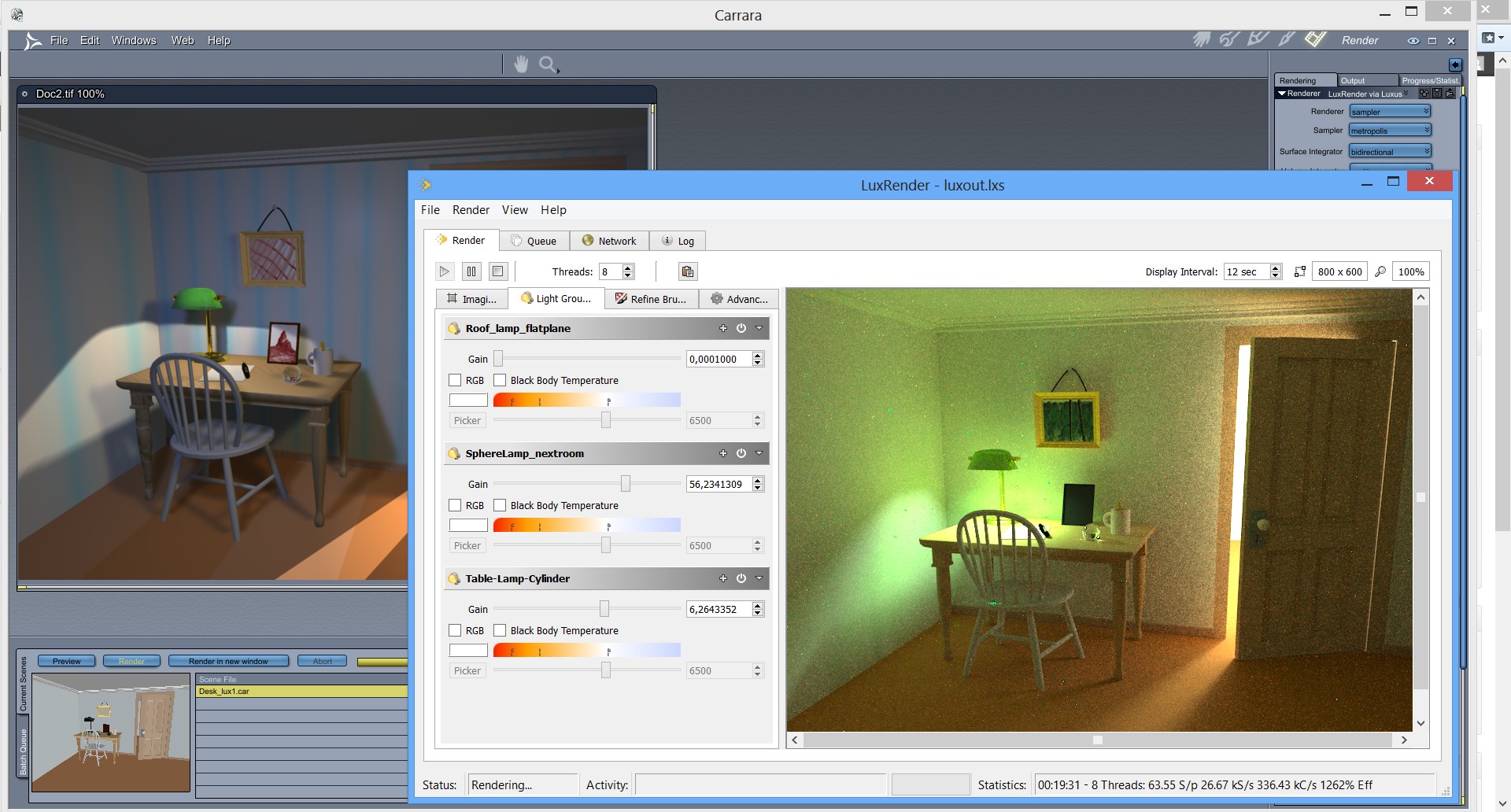
-Also, try to change the lights WHILE rendering in Luxrender, in the “Light group” sheet, check screenshot below.
-Also, switch Luxus render from “sampler” to “hybrid” to run GPU assisted rendering, limited to one light currently.
by 3drendero | Apr 11, 2013 | Carrara Plugins, News
Developer Spheric Labs that is selling Luxus the Luxrender plugin for Daz Studio, has already released an alpha release for the Carrara version.
Since it is an alpha version, it is very limited and should be seen a glimpse of what we may see in the near future if all goes well.
Here is the Forum thread with the discussion and download (updated): http://carraracafe.com/forum-3/#cid=1,tid=30
Direct download link for Luxus: http://sphericlabs.com/carrara/Luxus.zip
I have made the following simplifications to get this to you quicker.
1) Win64 only for now. (Please don’t kill me over this)
2) LuxRender must be installed like so
– CarraraFolder
— Carrara.exe
— LuxRender
— LuxRender.exe
3) Autotranslation is very primitive. I doubt it will work at all.
4) 2 new shaders. Lux Surface should be the top most shader, Lux Matte must be in the first slot of Lux Surface
5) Only the diffuse channel of Lux Matte will work. You can set a color or a texture there.
6) The Rendering Options only let you specify general stuff, not options on those things.
Get Luxrender here: http://www.luxrender.net/en_GB/standalone
Luxrender gallery: http://www.luxrender.net/forum/gallery2.php
Luxus for Daz Studio: http://www.daz3d.com/luxus
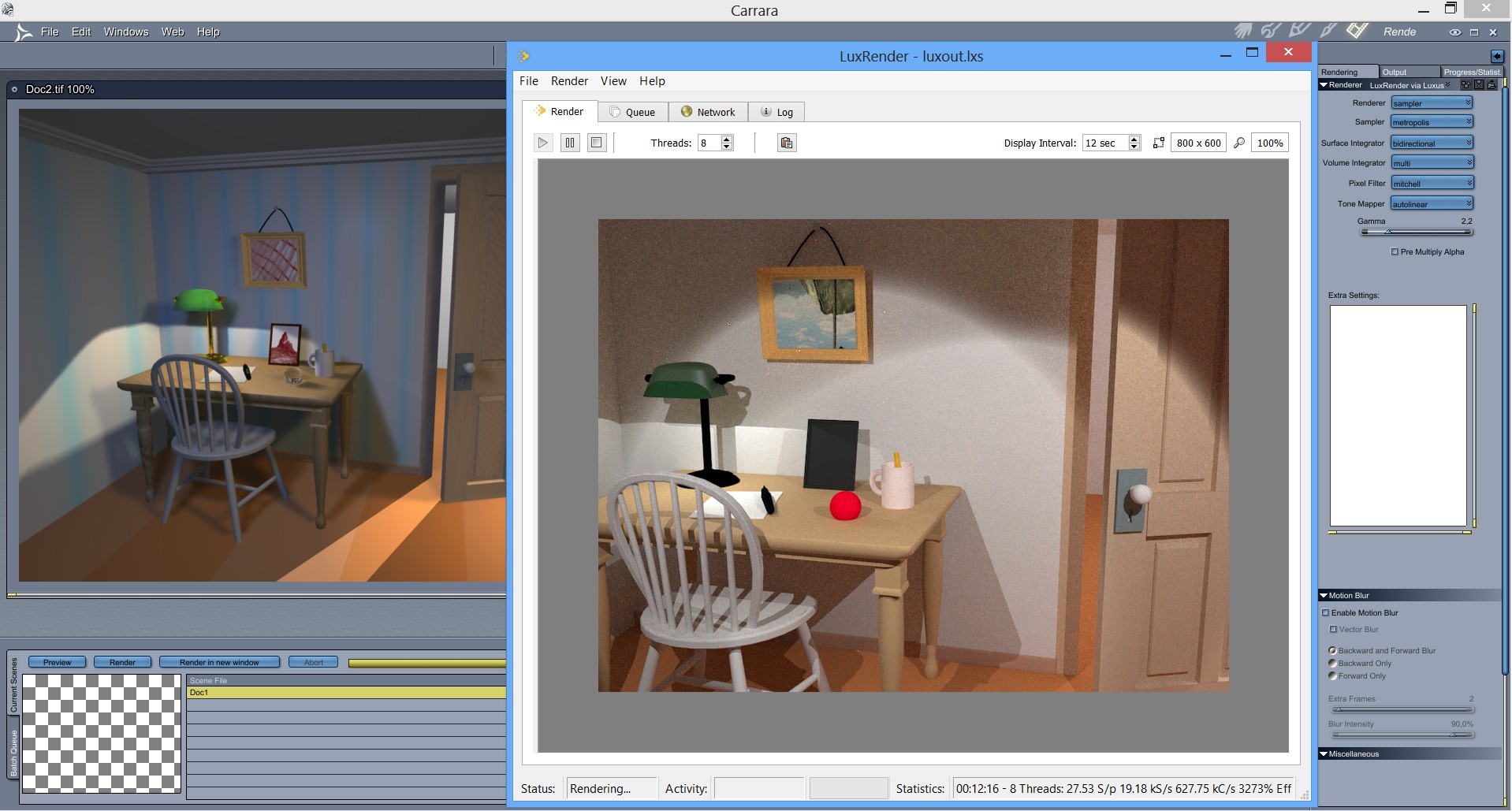
Updated 20130412: Added a quick render comparison of Carrara internal vs Luxrender via Luxus alpha.
To start Luxrender, note the top right corner: Renderer: Luxus via Luxrender, then press Render as usual.
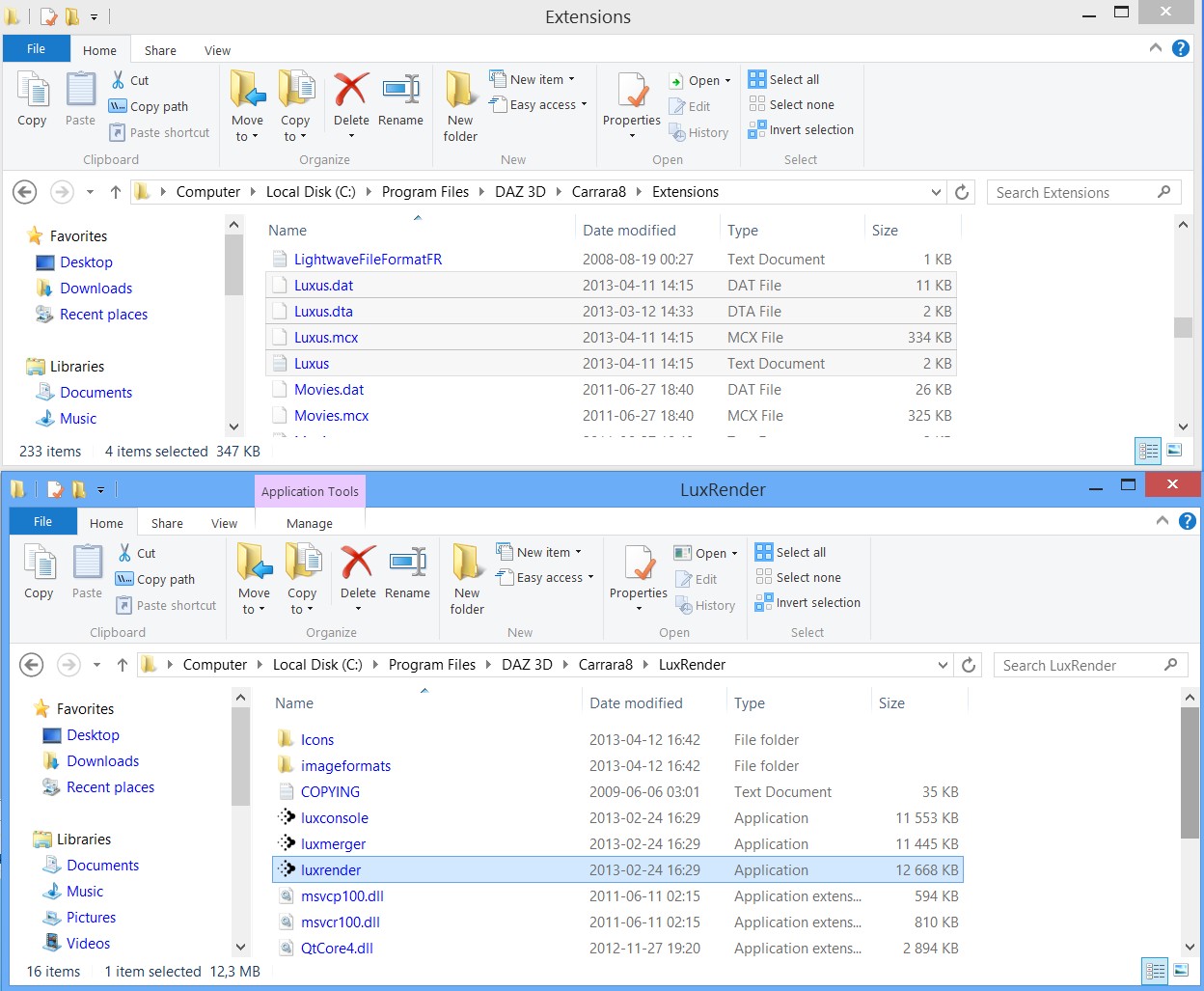
Installation: Extract the zip file of Luxus into the Extensions folder of Carrara 8 64bit. Install Luxrender in the Carrara 8 folder, see the screenshot below that shows the correct paths/files:
by 3drendero | Apr 9, 2013 | News
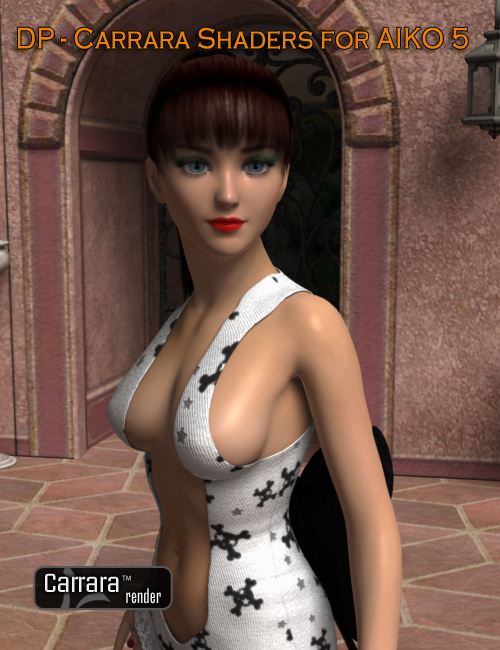
RingoMonfort is back in the shader business with the first Genesis shader kit for Carrara 8.5 beta.
The usual 30% off introduction price, but also 50% off Carrara 8 Pro gets you both for $99.47 if you are a PC member, an awesome deal!
Take a look at the DAZ 3D store and the forum thread for some more renders:
http://www.daz3d.com/dp-carrara-shaders-for-aiko-5
http://www.daz3d.com/forums/viewthread/20234/
DP – Carrara Shaders For Aiko 5 comes with 6 stunning skin shaders. This product takes advantage of Carrara’s most advanced shader features to create natural and photorealistic looking skin shaders. Add a striking look to your renders with DP – Carrara Shaders For Aiko 5.

by 3drendero | Apr 9, 2013 | News
Get Carrara 8 Pro for $99.47 with the new Darkwald release by HowieFarkes if you are a PC member.
Introduction sale means 30% off as usual, $13,97 for Darkwald only.
The Darkwald is quite different from Howie’s regular nature scene releases, take a look below and at the DAZ 3D store:
http://www.daz3d.com/darkwald
by 3drendero | Apr 7, 2013 | News
Holly Wetcircuit has posted about the new forum upgrade plans, here is the original thread if you want to join the discussion:
In the next weeks I’ll be launching the new section of the Cafe, with better forums, groups, and galleries.
No old posts are being deleted from THIS forum, but unfortunately there doesn’t seem to be a way to export old posts to the new forum…. We are still looking for a way to port them, but it’s possible we will be forced to start clean. I would like to keep the old forums for a topical “knowledge base” so we can organize tutorials by subject (something that has already been happening…)
The new forum allows for sharing files (.zip will download automatically, .car and ,cbr will have to be “saved” to disc as browsers don’t know what they are and try to open them as a text string… working on a way to force those to download), naturally we can embed videos and pics, also tagging other members in a post, full formatting, forum topics can be labeled as “answered”…, and everything else you’d expect for a real forum.
The new galleries allow privacy settings, so you could create a sub-gallery only to share with “friends”, or to keep private.
There are Groups which contain their own discussion forums (hopefully we can provide a home for some longterm group projects, as well as specialized knowledge groups like for Unity users etc…).
There are Profiles which some may want to use that work sort of like Facebook. If you enter your location you may be able to find other members in your area…., and be notified when someone tags you in a forum post…. Also private messaging.
Basically there is a lot of promise to be more than *just* another Carrara forum. DAZ 3D has paid for a software upgrade to help get this rolling. Everything is being tested, but the cosmetics will be changing as I can dig into the options a little better.
You won’t need to re-join, it will work with your existing profile. I’d love to try to organize some hosted topics and a freebie drive to help build traffic and get people interested…. With Carrara in limbo a while between versions there hasn’t been a lot of traffic here or there…. I’d like to try to change that.

by 3drendero | Apr 4, 2013 | Carrara Plugins, News
The bad news is that the YAToon site is offline, but the good news is that CarraraCafe mirrors all the versions of the freeware toon rendering plugin for Carrara, both for PC and Mac.
Also, the manual for Mimic Pro plugin for Carrara is now mirrored here, it got lost in the upgrade the the new DAZ 3D site.
Also, some watermarks have been added, when you want to show what software was used to render.
Thanks to Jay_NOLA for providing the files.
Get them all on the Downloads page right here: http://carraracafe.com/downloads/
by 3drendero | Mar 23, 2013 | News
Get the updated serial number for Carrara 8.5 beta at the usual place here:http://www.daz3d.com/forums/viewthread/4700/
Daz_Spooky also says that an updated beta build is being worked on, we just have to wait and be patient as usual…
http://www.daz3d.com/forums/viewthread/4700/P645













 Saving...